The HTML <select></select> element presents a menu of options. The options within the menu are represented by <option> elements, which can be grouped by <optgroup> elements.
Attributes
autofocus- Specifies that a form control should have input focus when the page loads, unless the user overrides it, for example by typing in a different control. Only one form element in a document can have this attribute, which is a Boolean. (HTML5)disabled- This Boolean attribute indicates that the user cannot interact with the control. If this attribute is not specified, the control inherits its setting from the containing element, for example<fieldset>; if there is no containing element with the disabled attribute set, then the control is enabled.form- The<form>element that this element is associated with (its "form owner"). The value of this attribute must be an ID of a<form>element in the same document. If this attribute is not specified, this element must be a descendant of a<form>element. This attribute enables you to place<select>elements anywhere within a document, not just as descendants of their<form>elements. (HTML5)multiple- This Boolean attribute indicates that multiple options can be selected in the list. If it is not specified, then only one option can be selected at a time.name- Specifies the name of the control.size- If the control is presented as a scrolled list box, this attribute represents the number of rows in the list that should be visible at one time. Browsers are not required to present<select>elements as a scrolled list box.
HTML example:
<select>
       <option>1</option>
       <option>2</option>
       <option>3</option>
</select>
Image example:
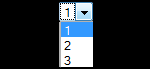

<select> in Firefox 3.6.10