

Notepad++ logo.
Notepad++ is a text editor and source code editor for Windows. It can also run on Linux and Mac OS X, using software such as Wine. One main advantage of Notepad++ over the built-in Windows text editor, Notepad, is tabbed editing, to easily work with multiple open files.
It is distributed as free software. The project is hosted on SourceForge.net, from where it has been downloaded over twenty million times. To display and edit text and programming language source code files, Notepad++ uses the Scintilla editor component.
Features
Some of its general features include:
- Tabbed document interface
- Drag-and-drop
- Multiple clipboard
- Split screen editing and synchronized scrolling
- Spell checker (requires Aspell) (Spell checker doesn't distinguish between text and code)
- Supports file formats such as Unicode, for international writing systems
- Find and replace over multiple documents
- File comparison
- Zooming
Programming languages
It also includes features for source code editing:
- Auto-completion
- Bookmarks
- Syntax highlighting and syntax folding
- Brace and indent highlighting
- Regular expression find and replace
- Speech synthesis
- FTP Browser (plug-in included in standard installation)
- Macro recording and execution
- Various tools such as line sorting, text encoding conversion, text folding
- File status auto-detection
- Plugins for multiline regular expression search and replace
Notepad++ supports syntax highlighting and syntax folding for 48 programming, scripting, and markup languages. It attempts to automatically detect the language that a given file uses, using a modifiable list of file extension bindings. Users may also manually set the current language, overriding the extension's default language. The program also supports autocompletion for a subset of the API of some programming languages.
Users can also define their own language (for syntax highlighting) and its respective API (for autocompletion) by using the built-in User Language Define System. Users may configure the syntax highlighting's font styles per element, per language, and the resulting formatted script may be printed in full-color (WYSIWYG). Additionally, Notepad++ displays indent guidelines when source code is indented with tab characters, and highlights closing braces, brackets and tags.
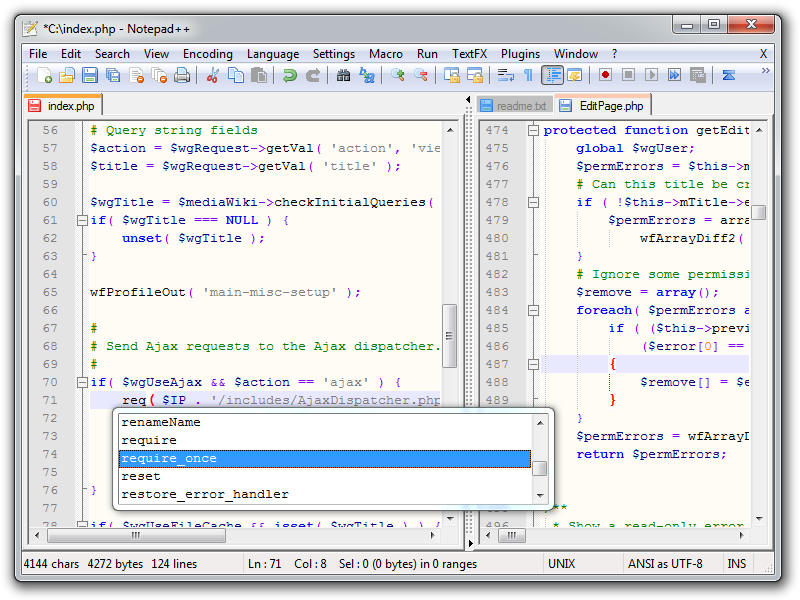

A PHP document being edited in Notepad++.
| This page uses Creative Commons Licensed content from Wikipedia (view authors). |